> For the complete documentation index, see [llms.txt](https://docs.d5render.com/llms.txt). Markdown versions of documentation pages are available by appending `.md` to page URLs; this page is available as [Markdown](https://docs.d5render.com/instruction-for-d5-for-teams/how-to-create-and-manage-team-accounts/team-brand-watermarks.md).
# Team Brand Watermarks
Team version supports uploading brand images that can be used as watermarks when rendering out images and videos.
## Guidance
1. Added team brand watermark in Team Details of My Space. (Added by Team Administrators and Owners only)
2. Tick the Watermark option in Client under Render Mode.
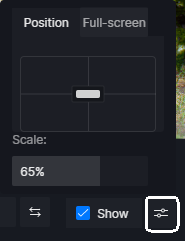
3. Supports to adjust the size, position in the image and full-screen state of watermarks.
{% hint style="info" %}
**Note**
1. Support .jpg, .png formats with images not exceeding 20MB.
2. Brand watermark only works with video and image.
3. In the state with brand watermark enabled, the output will be watermarked whether it is rendered directly or added to the render queue.
4. The team brand watermark is the same for all accounts in the same team.
5. If the watermark has been uploaded in the team backend but is still not shown in the client, please click 'Update Watermark'.
{% endhint %}